
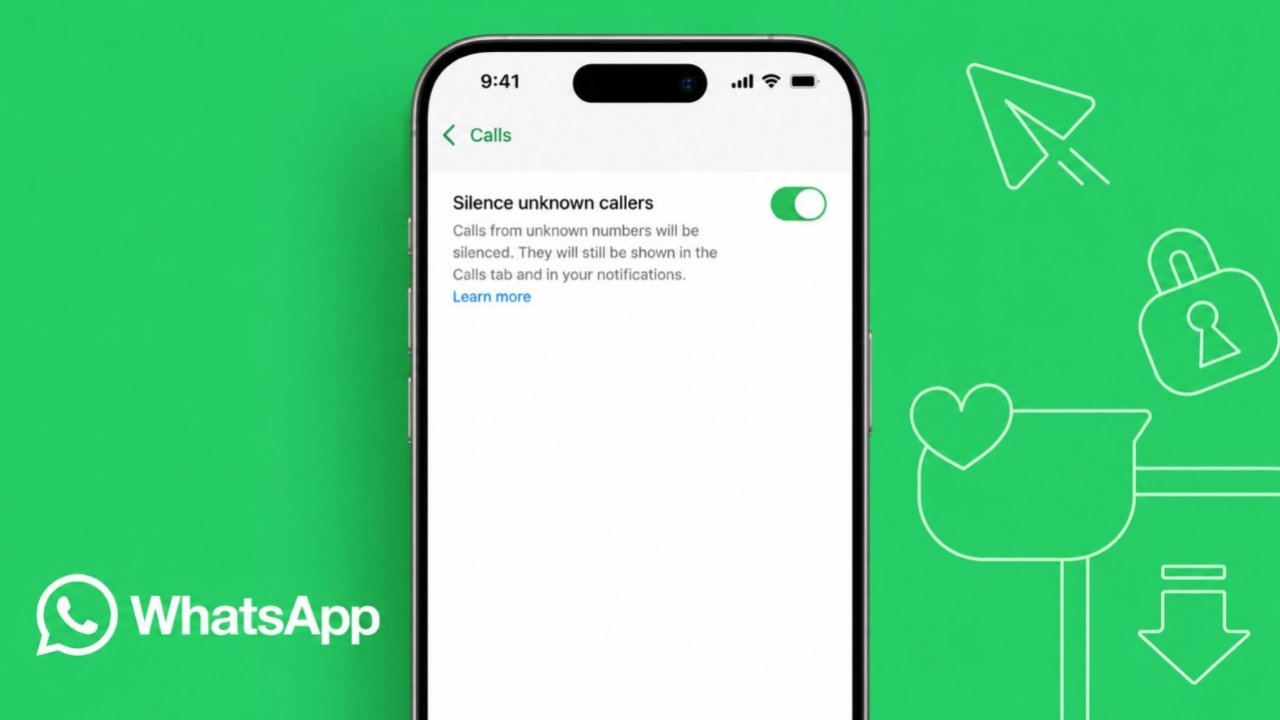
Silence Unknown Calls on WhatsApp helps improve user privacy. Many people receive unwanted calls every day. Some callers pretend to represent trusted organizations.
Others try different tricks to fool users. WhatsApp introduced this feature to reduce interruptions. It helps users handle unknown callers more safely.
Silence Unknown Calls on WhatsApp: Understanding the Feature
Spam calls have increased across many platforms recently. WhatsApp users also face this growing problem. Many unknown callers contact users without permission. Some callers claim to represent banks or businesses.
These callers often use misleading information. Their goal is gaining trust from users. Many innocent people become targets of scams.
To address this problem, WhatsApp introduced a helpful privacy feature. The feature is called Silence Unknown Callers. It works on both Android and iPhone devices.
The feature scans incoming WhatsApp calls automatically. It checks whether the caller is known. If the caller is unknown, ringing remains silenced.
This means your phone stays quiet completely. The call still reaches your WhatsApp account. However, the phone does not ring loudly.
Users can continue checking these calls later. WhatsApp stores call information for review.
Why WhatsApp Introduced This Feature
WhatsApp created this feature for several reasons.
- Reduce spam call interruptions.
- Improve user privacy protection.
- Limit scam call disturbances.
- Help users manage unknown callers.
- Allow safer communication experiences.
- Keep important call records available.
The feature balances privacy and accessibility carefully. Users remain informed without constant interruptions.
Who Is Considered an Unknown Caller
An unknown caller meets specific conditions. A caller becomes unknown when their number remains unsaved.
The person may also be someone unfamiliar. This includes users who never contacted you before.
If you have never interacted previously, WhatsApp may treat them as unknown. This simple system helps identify unfamiliar callers quickly.
Steps for Android and iPhone
WhatsApp makes activation very simple. The process only takes a few moments.
How to Enable the Feature on Android
Android users can follow these steps.
Step 1: Open WhatsApp on your smartphone.
Step 2: Tap the three-dot menu icon.
Step 3: Open the Settings section.
Step 4: Select the Privacy option.
Step 5: Scroll down to Calls.
Step 6: Tap the Calls section.
Step 7: Enable Silence Unknown Callers.
The feature becomes active immediately afterward. Unknown callers will no longer ring normally. Their calls remain visible within WhatsApp.
How to Enable the Feature on iPhone
iPhone users follow a similar process.
Step 1: Open WhatsApp on your iPhone.
Step 2: Tap the Settings tab below.
Step 3: Open the Privacy section.
Step 4: Select the Calls option.
Step 5: Turn on Silence Unknown Callers.
The setting activates immediately after enabling. Future unknown calls remain silent automatically.
What to Do When Option Is Missing
Some users may not find this option. This usually means WhatsApp needs updating. Follow these steps on Android:
- Open Google Play Store.
- Search for WhatsApp.
- Install available updates.
Follow these steps on iPhone:
- Open App Store.
- Search for WhatsApp.
- Install the newest version.
After updating, check settings again. The feature should appear normally afterward.
What Happens After Activation
Many users wonder about feature behavior. The setting does not block communication completely. Unknown callers can still reach your account. The main difference involves call ringing.
When unknown callers contact you:
- Your phone does not ring.
- Calls remain visible later.
- Notifications still appear normally.
- Missed calls stay recorded.
- Call details remain available.
This approach provides better control. Users avoid interruptions without losing information.
Calls Still Appear Inside WhatsApp
WhatsApp continues recording silent calls. You can open the Calls tab anytime. Every unknown call remains visible there.
This helps users review calls later. You can decide whether communication is necessary. Nothing important gets hidden completely.
Notifications Continue Appearing
The feature does not remove notifications. Missed call notifications still appear normally. Users remain informed about incoming attempts.
This allows better decision making afterward. Users can evaluate each caller individually.
Returning Calls Remains Possible
Some unknown callers may be legitimate. Perhaps someone changed their phone number. Maybe a business needs contacting urgently.
WhatsApp allows users to return calls easily. Simply open the Calls tab. Select the desired caller. Then place the call normally. The feature never prevents call returns.
Messaging Still Works Normally
Users can continue conversations through chat. Silent callers may still send messages. You can read and reply anytime.
The feature only affects call ringing. Other communication options remain available.
Important Limitation Users Should Understand
There is one important point. Suppose you contact a silenced caller. You may call them back later. You may also send a message.
After this interaction, future calls may behave differently. WhatsApp may recognize that number differently afterward.
As a result, future calls could ring normally. This can happen despite feature activation. Therefore, users should remember this behavior.
When Blocking Is a Better Option
Sometimes silencing may not be enough. Certain callers repeatedly create disturbances. Some continue unwanted communication frequently.
In these situations, blocking works better. WhatsApp provides a blocking option directly.
Blocking prevents future communication effectively. Users wanting stronger protection can use blocking.
Frequently Asked Questions About the Feature
What Is an Unknown Caller on WhatsApp?
An unknown caller has an unsaved number. They may never have contacted you previously.
Does WhatsApp Automatically Block Unknown Callers?
No. WhatsApp only silences incoming calls. Calls still appear inside WhatsApp records.
Can I Call Back a Silenced Caller?
Yes. Open the Calls tab directly. You can return calls whenever necessary.
Will Missed Calls Still Appear?
Yes. Missed calls remain visible normally. Notifications also continue appearing afterward.
Can I Disable the Feature Later?
Yes. Visit the Calls settings section. Turn off the toggle anytime desired. The feature can be enabled again later.
The Bottom Corner
Silence Unknown Calls reduces interruptions from unknown callers effectively. The feature keeps important call records available. Users can still review notifications and respond later.
Android and iPhone users can activate it easily. This simple tool helps create safer communication experiences.