
Reset the Password of Your Netflix Account quickly as users forget passwords because many accounts exist.
Netflix offers simple recovery options for forgotten passwords. This guide explains every method in clear steps.
Reset the Password of Your Netflix Account Using Different Methods
Netflix remains among the most popular streaming platforms. It offers thousands of movies, shows, documentaries, and anime. The service works on many internet-connected devices worldwide.
Today, people manage many online account passwords. They use passwords for shopping, travel, banking, and entertainment. Because of this, forgetting passwords becomes very common.
Netflix understands this common problem very well. Therefore, it provides several password recovery methods. Users can recover access through email, SMS, or billing information.
Why Users Forget Netflix Passwords
Many users face password-related problems regularly.
Common reasons include:
- Too many online accounts today.
- Different passwords for different services.
- Long gaps between Netflix logins.
- Recently changed account passwords.
- Using complex password combinations.
Fortunately, Netflix provides simple recovery solutions.
Available Password Recovery Options
Netflix currently offers three main recovery methods.
These methods include:
- Email password reset.
- SMS password reset.
- Billing information recovery.
Each method works under different situations.
Through Email
Email recovery remains the easiest available option. Most Netflix users prefer this method today.
Steps for Email Password Reset
Follow these instructions carefully:
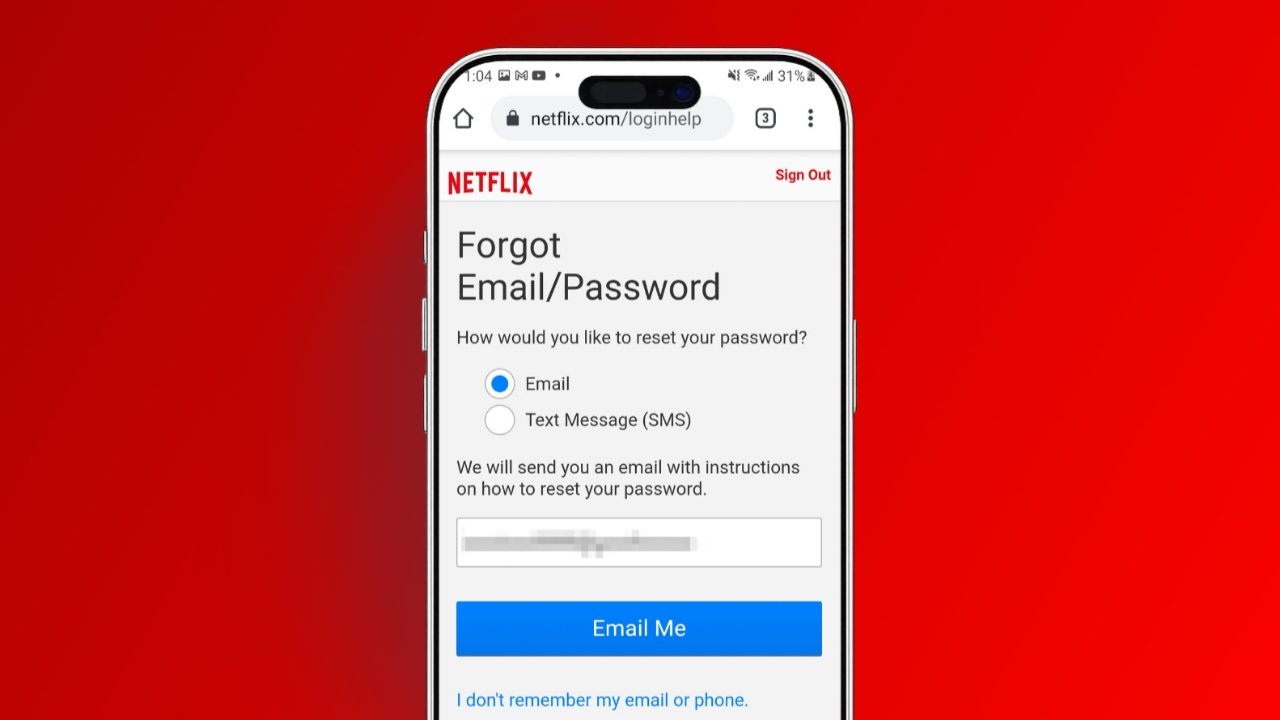
- Open the Netflix Login Help page.
- Select the Email recovery option.
- Enter your registered email address.
- Click the “Email Me” button.
- Open your email inbox immediately.
- Find the Netflix recovery message.
- Open the received email.
- Click the password reset link.
- Netflix signs you into account automatically.
- Create a completely new password.
Your new password must be different. Netflix does not allow previous passwords again.
Important Things About Email Recovery
The recovery email usually arrives quickly. Most users receive it within seconds.
If unavailable, check these folders:
- Spam folder.
- Junk folder.
- Promotions folder.
Always use your registered Netflix email address.
Through SMS
Some users forget their registered email addresses. Others may not access email accounts easily.
For these situations, SMS recovery helps greatly.
Steps for SMS Password Reset
Complete the following process carefully:
- Open any internet browser.
- Visit Netflix Login Help page.
- Choose Text Message SMS option.
- Enter registered mobile number.
- Tap the “Text Me” button.
- Receive verification code through SMS.
- Enter received verification code.
- Create a new password.
- Save password changes successfully.
Important SMS Recovery Information
Netflix sends a temporary verification code.
Remember these points:
- Code expires after twenty minutes.
- Use code immediately after receiving.
- Enter code correctly the first time.
- Create a unique new password.
This method works quickly for many users.
Using Billing Information
Sometimes users forget both email and phone details. Netflix provides another recovery option for them.
This method requires payment information previously used.
Steps for Billing Information Recovery
Follow these instructions carefully:
- Open Netflix Login Help page.
- Select forgotten email and phone option.
- Enter your first name.
- Enter your last name.
- Provide payment card details.
- Enter the linked card number.
- Click the Find Account button.
- Wait for account verification.
- Receive recovery email from Netflix.
- Create a new password.
When This Method Works
This option works under specific conditions.
Requirements include:
- Correct account holder name.
- Correct payment card number.
- Matching Netflix account details.
Incorrect information may prevent recovery.
Change Netflix Password While Logged In
Users with account access can change passwords. This process differs from password recovery methods.
Change Password on Web Browser
Follow these steps:
- Sign into Netflix account.
- Open Account settings page.
- Visit the Membership and Billing section.
- Select Change Password option.
- Enter current password.
- Enter the new password twice.
- Save changes successfully.
Change Password on Android Devices
Android users can change passwords easily.
Steps include:
- Open Netflix mobile application.
- Sign into your account.
- Visit Account settings.
- Open Membership and Billing.
- Select Change Password.
- Enter current password.
- Enter the new password twice.
- Save password changes.
Change Password on iPhone Devices
iPhone users follow a similar process.
Important information includes:
- Open Netflix application first.
- Access Account settings section.
- Select Change Password option.
- Browser opens automatically afterward.
- Complete password change process.
Always verify password changes successfully.
Sign Out All Connected Devices
After changing passwords, increase account security.
Netflix provides an important security option.
Users should:
- Sign out all devices.
- Require new device sign-ins.
- Use new passwords everywhere.
- Remove unauthorized account access.
This step protects accounts effectively.
What to Do If Account Gets Hacked
Hackers sometimes access streaming accounts. They may change passwords, emails, or phone numbers.
This can lock owners completely out.
Contact Netflix Support Immediately
Quick action improves recovery chances greatly.
Follow these steps:
- Visit Netflix Help Center.
- Click the Contact Us option.
- Describe the problem clearly.
- Mention unauthorized account access.
- Select chat support option.
- Or choose phone support.
Support agents help recover compromised accounts.
Contact Support Through Netflix App
Netflix applications also provide support access.
Inside the application:
- Open menu section.
- Select Contact Us option.
- Choose Call Us.
- Or start a live chat.
Support wait times usually appear beforehand.
Protect Financial Information
Hackers may access stored payment methods.
Take immediate action:
- Contact your bank immediately.
- Report unauthorized transactions.
- Request charge reversals.
- Cancel affected payment cards.
- Replace compromised cards.
These steps reduce financial risks significantly.
Netflix Subscription Plans Available in India
Netflix offers several subscription choices today.
Mobile Plan
Features include:
- Rs. 149 monthly price.
- One screen support.
- Standard definition streaming.
Basic Plan
Features include:
- Rs. 199 monthly price.
- One screen support.
- Standard definition content.
Standard Plan
Features include:
- Rs. 499 monthly price.
- Two screen support.
- Full HD quality.
Premium Plan
Features include:
- Rs. 649 monthly price.
- Four screen support.
- Ultra HD quality.
Users can select plans according to their needs.
Netflix Password Sharing Policy Explained
Netflix recently strengthened password sharing rules. The company wanted better account management worldwide.
Current Password Sharing Rules
The policy allows sharing within households.
Important points include:
- Household members can share accounts.
- Users must live together.
- Profiles remain available normally.
- Outside sharing faces restrictions.
Verification for Different Locations
Family members sometimes move elsewhere temporarily.
In such situations:
- Netflix may request verification.
- One-time codes may appear.
- Account ownership gets confirmed.
The policy first launched in America. Later, other countries adopted similar rules.
Tips to Keep Netflix Accounts Safe
Strong security prevents future account problems.
Create Strong Passwords
Good passwords improve account protection.
Useful tips include:
- Use unique password combinations.
- Avoid common words.
- Mix letters and numbers.
- Change passwords regularly.
Use Password Managers
Managing passwords becomes difficult over time.
Password managers help by:
- Storing passwords safely.
- Creating strong passwords.
- Reducing password fatigue.
- Improving account security.
Protect Email Accounts
Email security remains extremely important.
Helpful actions include:
- Enable email two-factor authentication.
- Use strong email passwords.
- Monitor unusual login activity.
Netflix currently lacks standard two-factor authentication. However, unusual logins may trigger verification codes. These codes arrive through registered email or phone numbers.
Managing Netflix Account Information
Netflix allows users to update account details.
Users can modify:
- Email addresses.
- Phone numbers.
- Passwords.
- Payment methods.
Updating Payment Information
Follow these steps:
- Open Account settings.
- Visit Membership and Billing.
- Select Manage Payment Information.
- Update existing card details.
- Add backup payment methods.
- Save all changes.
Preferred payment methods display clearly.
The Bottom Corner
Reset the Password of Your Netflix Account using simple recovery methods. Email, SMS, and billing information provide access.
Strong passwords, secure email accounts, and device sign-outs improve protection. Following these steps keeps Netflix accounts safe and accessible.