
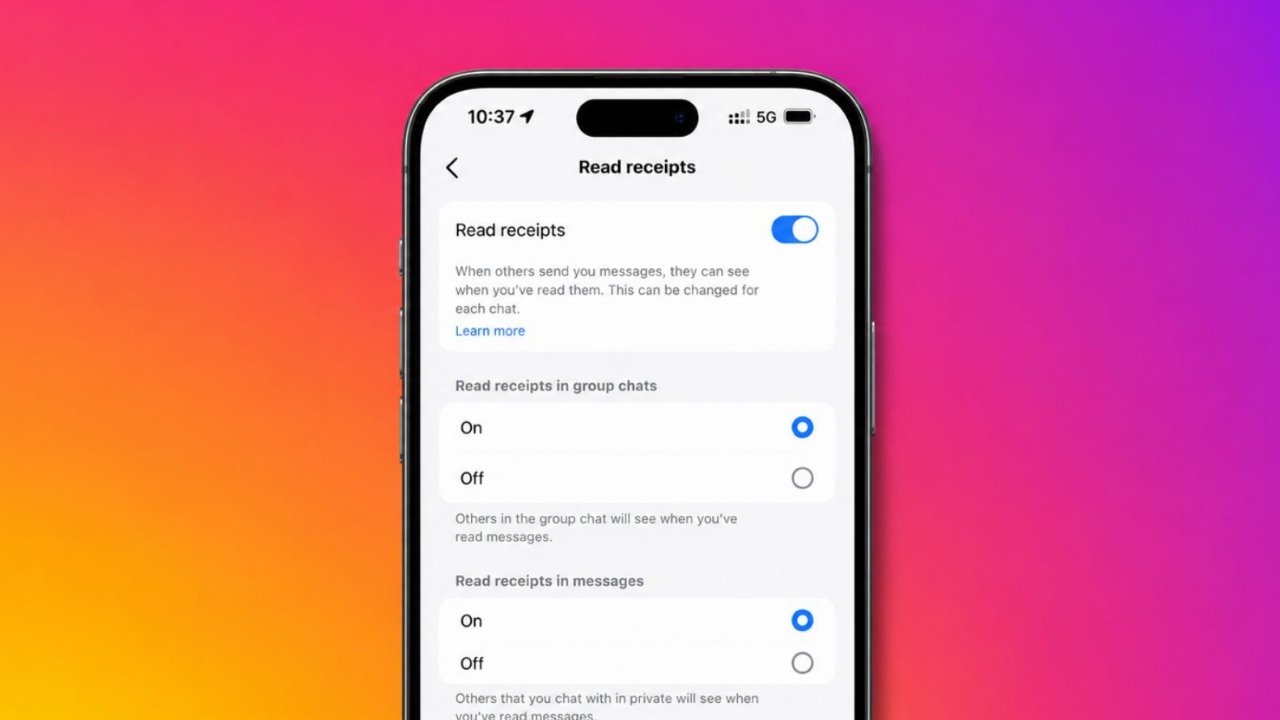
Disable Read Receipts on Instagram to enjoy better privacy. Many users prefer reading messages without pressure. This feature helps delay replies without confusion.
Instagram now offers simple controls for everyone. You can disable receipts for one chat. You can also disable them for all.
Understanding the Read Receipts on Instagram
Instagram keeps adding useful privacy features regularly. Read Receipts are among those helpful features. They show when someone reads a message.
When you send a direct message, Instagram tracks activity. After the receiver opens the message, Instagram displays “Seen” below messages. This confirms the message was viewed.
The same rule applies to your account. When you read another person’s message, they receive confirmation. They can see that you viewed it.
Many users find this feature helpful daily. It confirms messages reached the intended person. It also helps during important conversations online.
However, not everyone likes this feature completely. Sometimes people need extra time before replying. They may be working or studying elsewhere.
Some users prefer thinking before sending responses. Others may simply be too busy. Read receipts can create unwanted expectations.
The sender may expect an immediate response. Delayed replies can sometimes cause misunderstandings. This situation may feel uncomfortable for many.
Because of these reasons, Instagram introduced controls. Users can now manage read receipts easily. They can choose privacy according to needs.
Why Users Disable Read Receipts
Many users disable read receipts for privacy.
Common reasons include:
- More time before replying.
- Less pressure during conversations.
- Better control over personal interactions.
- Reduced social anxiety online.
- Fewer misunderstandings with contacts.
- Improved privacy during busy schedules.
These benefits make the feature very useful.
Disable for One Chat
Instagram allows separate settings for conversations. This option works with specific users only.
You can choose one conversation privately. Other chats will continue normally afterward.
Steps to Disable Read Receipts for One Chat
Follow these steps carefully:
- Open Instagram on your smartphone.
- Tap the Messages icon.
- Open the desired conversation.
- Tap the person’s name above.
- Select Privacy & Safety settings.
- Locate the Read Receipts option.
- Turn the setting off.
After completing these steps, privacy improves immediately. The selected person cannot confirm message views.
This setting remains limited to that chat. Other conversations keep their current settings.
Benefits of Chat-Specific Settings
This option offers greater flexibility daily.
Benefits include:
- Privacy from selected contacts.
- Normal settings for remaining chats.
- Better conversation management.
- More personalized privacy controls.
Many users prefer this targeted approach. It avoids changing every conversation setting.
Important Note About Individual Chats
Read receipts usually remain enabled automatically. Turning this option off prevents confirmation messages.
The sender will not know message status. Your activity becomes more private instantly.
Disable for All Chats
Some users want complete message privacy. Instagram supports this through global settings.
This method covers every conversation automatically. No sender can confirm viewed messages.
Steps to Disable Read Receipts Everywhere
Follow these instructions carefully:
- Open Instagram application first.
- Visit your profile page.
- Tap the menu icon.
- Open Settings and Activity.
- Select Messages and Story Replies.
- Find Show Read Receipts.
- Turn the option off.
Once disabled, all chats become protected. Senders cannot verify message views easily.
This setting works across your account. You do not need extra adjustments.
Advantages of Global Settings
Many users prefer complete privacy coverage. Benefits include:
- Privacy across every conversation.
- Faster setup process.
- No need for repeated changes.
- Consistent message experience.
- Better control over communication habits.
This option works well for active users.
Important Setting Information
Global settings affect all conversations equally. They can also override chat-specific preferences.
If read receipts become enabled later, previous privacy settings may change.
Instagram also offers flexibility here. You can disable receipts globally first. Then enable them for selected chats. This creates customized privacy controls easily.
Other Ways to Read Messages Without Showing Seen
Before Instagram introduced official controls, users used alternative methods. Several methods still work today.
Use Airplane Mode
Airplane Mode remains a popular solution. This method temporarily disconnects internet connections. Instagram cannot immediately update message status.
Steps to Use Airplane Mode
Follow these instructions carefully:
- Receive the Instagram message first.
- Avoid opening the message immediately.
- Enable Airplane Mode.
- Disconnect Wi-Fi and mobile data.
- Open Instagram carefully.
- Read the message completely.
- Close Instagram afterward.
- Remove Instagram from background tasks.
- Turn Airplane Mode off.
This method prevents immediate updates temporarily.
Important Limitation
This solution has one limitation. When internet access returns later, Instagram may send read receipts. Therefore, this method offers temporary privacy only.
Read Message Notifications
Notifications provide another useful option. Instagram message previews appear within notifications. These previews display part of message content.
You can read preview text quickly. This does not trigger read receipts.
Benefits of Notification Previews
Advantages include:
- No need to open Instagram.
- No Seen status appears.
- Quick access to messages.
- Easy privacy protection.
However, long messages appear only partially. Full content may remain hidden.
Restrict an Account
Instagram offers a Restrict feature too.
This feature provides additional privacy controls. Many users use it for unwanted interactions.
Steps to Restrict an Account
Follow these simple instructions:
- Open the person’s profile.
- Tap the three-dot menu.
- Choose Restrict.
- Confirm your decision.
After restricting the account, message interactions become more private.
This option helps manage communication discreetly.
When Restricting Can Help
Restricting may help in situations involving:
- Unwanted conversations.
- Privacy concerns.
- Reduced interaction preferences.
- Better message management.
Many users find this option useful.
Things to Take
- Instagram now supports disabling read receipts.
- Settings work for one chat separately.
- Settings also work for all chats.
- Airplane Mode offers temporary privacy protection.
- Notification previews avoid Seen notifications.
- Restricting accounts adds extra privacy controls.
As We Conclude
Disable Read Receipts on Instagram for greater message privacy. The feature helps reduce pressure significantly. Users can read messages at convenience.
Instagram offers controls for individual conversations. It also supports account-wide settings. These options create a comfortable messaging experience.