
Add A Profile Song To Your Instagram and express yourself. Instagram now lets users showcase their favorite music. This feature makes profiles feel more personal.
It also creates new ways for interactions. Followers can discover interests through music choices.
Add A Profile Song To Your Instagram And Personalize Your Profile
Instagram continues adding features for better engagement. The platform is owned by Meta today. A recent update introduced profile music support. Users can now display songs publicly.
The feature may sound familiar to many. Myspace offered similar profile music years ago. Instagram has now revived that creative idea. Music adds personality beyond photos and videos.
A profile song tells visitors more information. It can reflect interests, emotions, or moods. Music often communicates feelings better than words. This makes profiles more expressive and memorable.
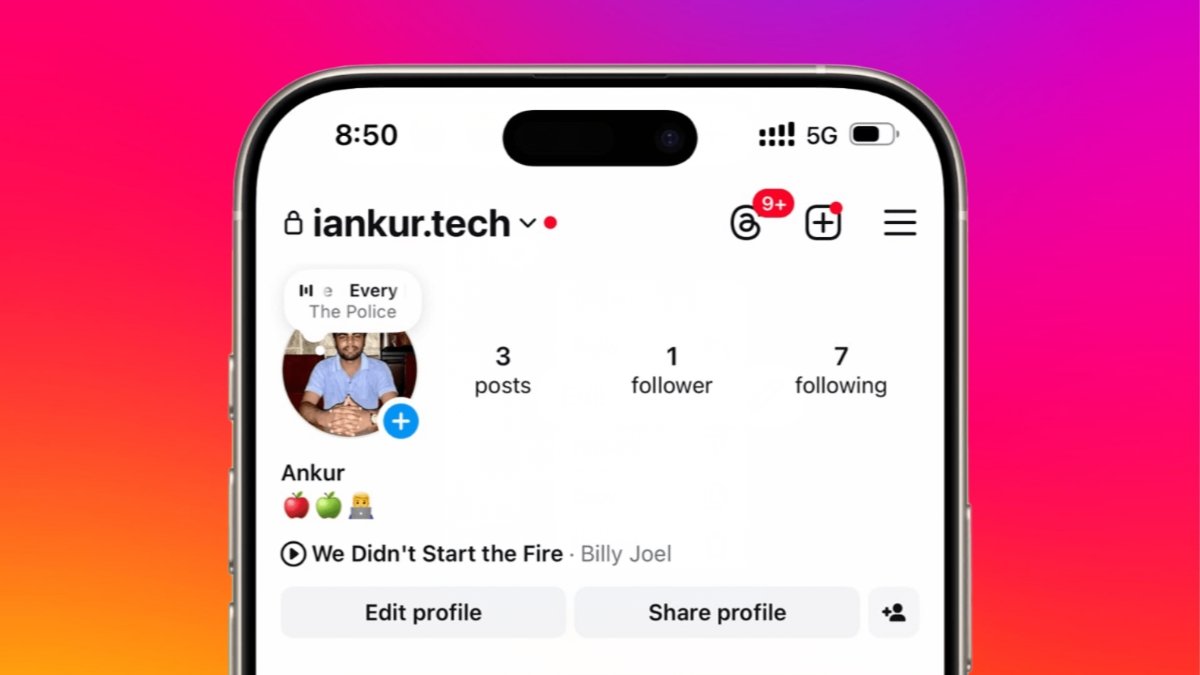
Followers visiting your profile can notice music. The selected song appears with profile details. It sits below the bio section usually. External links may appear above the song.
The feature creates easy conversation opportunities online. Shared music interests can connect people quickly. Followers may discover artists through your profile. Friends can discuss songs they both enjoy.
For creators, profile music offers extra benefits. Singers can promote their latest tracks easily. Music composers can showcase original audio work. Artists gain another tool for visibility.
Why Many Users Like Profile Songs
There are several reasons behind popularity growth.
- Profiles become more unique and interesting.
- Music reflects personal tastes clearly.
- Followers discover favorite songs quickly.
- Conversations start through shared interests.
- Profiles gain additional creative elements.
- Artists receive extra promotional opportunities.
Adding music requires only a few minutes. The process remains simple for most users. Both Android and iPhone users qualify. Updated applications support this useful feature.
Add A Profile Song Using Easy Steps
Before starting, update Instagram to the latest version. Older versions may not show music options. Visit your device application store first.
Android users should open Google Play Store. iPhone users should open the Apple App Store. Install available updates before continuing further.
Step 1: Open Instagram Application
Launch Instagram from your smartphone home screen. Wait until the application loads completely.
Step 2: Visit Your Profile Page
Tap your profile picture at bottom right. This opens your personal profile screen instantly.
Step 3: Open Edit Profile Section
Locate the Edit Profile button displayed. Tap it to access profile settings.
Step 4: Find Music Option
Inside profile settings, locate Music option. Tap Music to continue the setup process.
Step 5: Add A New Song
Select Add Music to Your Profile. Some devices show a plus icon. Tap the available option shown there.
Step 6: Search For Preferred Music
Use the search feature for songs. Enter the track name you prefer. Browse available results and choose one.
Step 7: Select Song Portion
Instagram allows choosing a specific section. Pick the part you like most. This clip represents your profile music.
Step 8: Trim And Confirm
Adjust song length when necessary. Tap Done or checkmark to confirm. Save changes after final selection.
Step 9: Check Your Profile
Return to your profile page afterward. The selected song should appear immediately. Visitors can now see your music.
Quick Steps Summary
Follow these actions for faster setup.
- Update Instagram application first.
- Open Instagram on your smartphone.
- Visit your profile page.
- Tap Edit Profile option.
- Open Music section available.
- Add a profile song.
- Search for a preferred music track.
- Select the desired song portion.
- Confirm and save changes.
- Return and check profile.
The complete process takes only minutes. Most users can finish quickly without difficulty.
Add And Manage Music Easily
After adding music, profile visitors notice it. A song title appears below profile details. A small play button appears beside it.
Visitors control playback themselves completely. The music never starts automatically for listeners. They must tap the play button. This provides a better browsing experience.
When activated, music plays during profile viewing. Visitors can continue exploring profile information. Photos and details remain accessible simultaneously.
However, playback does not continue everywhere. The song stops after opening posts directly. This prevents distractions while viewing content.
Instagram also provides song information access. Visitors can tap song details displayed. This opens the related audio page. Users can explore additional music information.
How To Change Profile Music
Music preferences often change over time. Instagram makes song replacement very simple.
Follow these steps to change music.
- Open your Instagram profile.
- Tap current song title.
- Select Change Profile Song option.
- Search another preferred track.
- Choose the desired music section.
- Save changes successfully.
The new song appears immediately afterward. Visitors will see updated profile music.
How To Remove Profile Music
Some users may remove songs completely. Instagram provides an easy removal process.
Follow these simple removal steps.
- Visit your profile page.
- Tap displayed song title.
- Select Remove Profile Song.
- Confirm your selection.
- Return to profile screen.
The music disappears from your profile instantly. You can add another song later.
Frequently Asked Questions
Is Profile Music Free To Use?
Yes, the feature remains completely free. Instagram does not charge extra fees. Suggested songs require no separate purchase.
Why Can’t I Find a Music Option?
Usually, the application needs updating first. Install the newest Instagram version available. New features often arrive through updates.
Do Songs Play Automatically?
No, songs never start automatically. Visitors must tap the play button. Playback remains completely user controlled.
Can Visitors See Song Information?
Yes, visitors can view song details. They may also open related audio pages. This helps users discover new music.
Who Benefits Most From Profile Music?
Regular users enjoy creative profile customization. Artists gain additional music promotion opportunities. Both groups benefit from better engagement.
Benefits Of Using Profile Music
Profile music offers several useful advantages.
- Shows personality without extra words.
- Makes profiles more memorable.
- Encourages follower interactions naturally.
- Highlights favorite music choices.
- Promotes songs for creators.
- Adds creative profile customization.
- Improves visitor engagement levels.
These benefits explain growing feature popularity. Many users enjoy sharing musical interests.
The Bottom Corner
Add A Profile Song To Your Instagram for creativity. The feature makes profiles more engaging instantly. It helps users share personality through music.
Setup remains simple, free, and quick. Update Instagram today and start personalizing profiles.